

QuickBooks Payroll
Prerequisites - Creating an OAuth App
- Sign in to your developer account on Intuit Developer Portal
- Select My Hub > App dashboard from the upper-right corner of the toolbar.
Select the app card with a + to create a new app. - Enter the Name of the app and other Basic details.
- Then, in the Add permissions section, under Restricted scopes, enable the scopes based on your requirement. If you're unsure which to pick, enable the default scopes listed below.
Some scopes (for example
payroll.compensation.read) are Premium scopes and are not available on the free tier. To get access:
- Upgrade to the Silver tier or higher on the Intuit Developer Portal.
- Your app should now have access to the Premium API scopes. Go to your app's Permissions page in the Developer Portal. Enable the
payroll.compensation.readscope under Restricted scopes.
- And add
https://app.getknit.dev/oauth/authorizeas a redirect URI, as shown below.
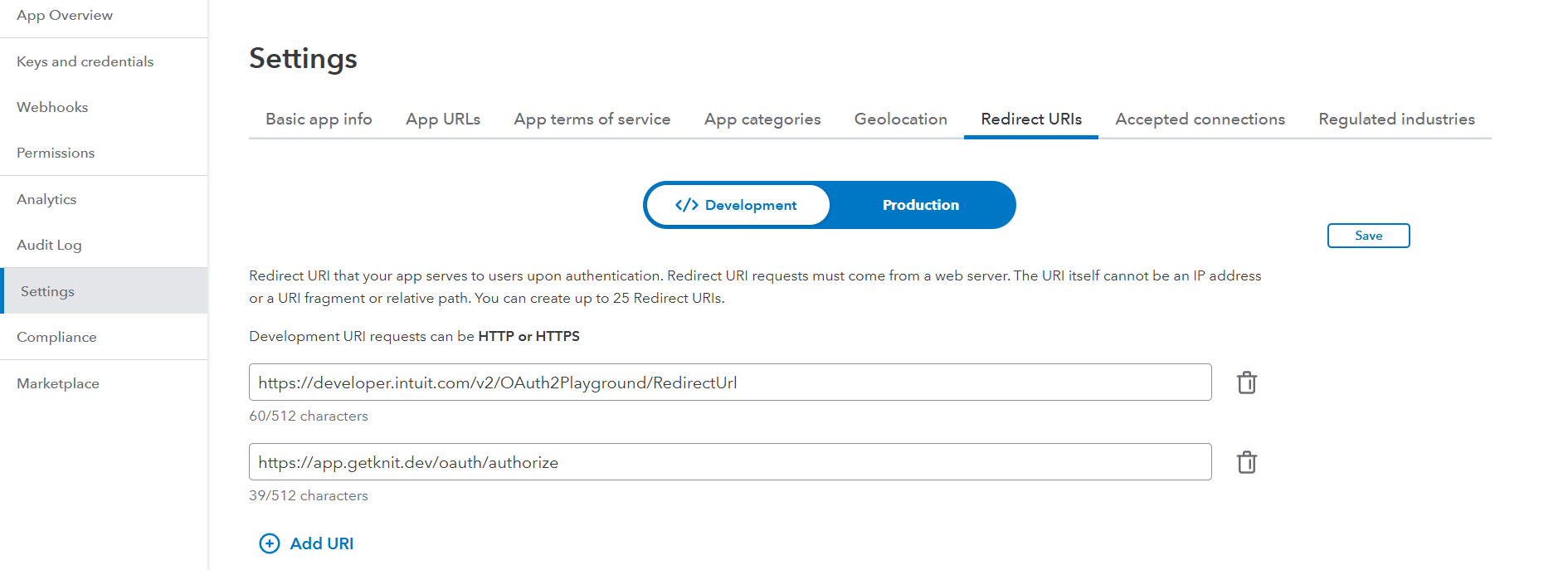
- On Successful Creation of your App, You should get a Client Id and a Client Secret, use these values while doing a Integration on Knit.
Knit Integration Guide - Quickbooks Payroll
- ClientId and Client Secret: Use the values you obtained in the above step here.
- Scope (Optional): Enter the scope(s) you enabled in the Restricted scopes section above, as a space-separated string if you're enabling multiple scopes. If no value is passed here, the following default scope is used:
qb.employee.read qb.payroll.benefits qb.payroll.compensation.read.qb.employee.readis a minimum required scope to perform a successful integration. - Country (Optional): For countries outside the US, pass the 2-letter country code. For example, for Canada, pass
CA. For Great Britain, passGB. If no value is passed here,USis assumed by default.
Updated about 2 months ago
Did this page help you?