

Ashby - Assessments Setup Guide
A step-by-step guide to configuring the Ashby Assessments integration through Knit, covering authentication, required setup steps, and what to check before going live.
Prerequisites
- An active partnership with Ashby for the assessments integration.
If you haven't established this yet, refer to the Ashby Partner Program or contact your Ashby account manager. - During the partnership onboarding process, provide
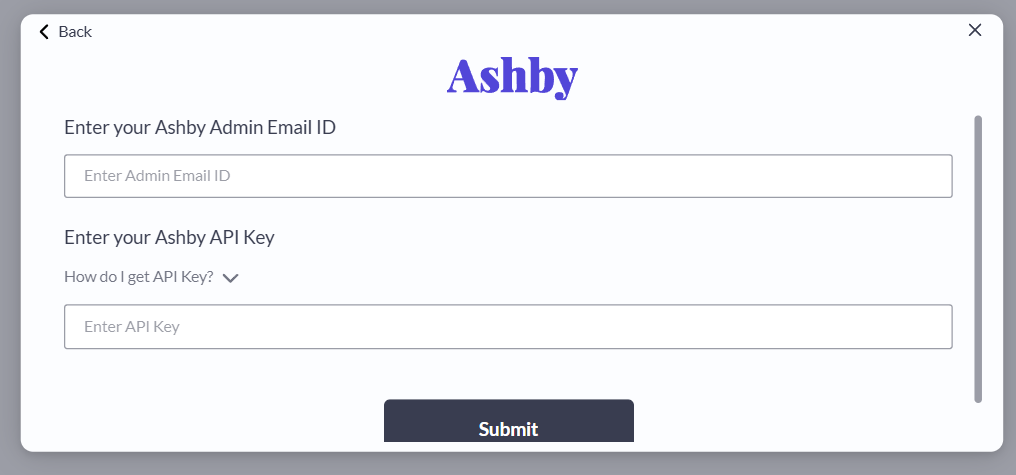
https://workflows.getknit.dev/webhook/ashby/as the base URL for all API calls initiated by Ashby. - An active Ashby Integration with Knit, for creating an Ashby Integration you will need an admin email Id and a API Key.
Setup Instructions
Follow the steps below to setup Ashby assessments integration via knit.
- Create an Ashby integration , if you haven’t already.
- Use the Create ATS Assessment Secrets API to generate the credentials required for configuring Ashby assessments integration. The response returns:
secretKey– used as the API KeybaseUrl– used as the Base URL
- Share the
secretKeyandbaseUrlwith Ashby through your established partnership channel (e.g., partner support, account manager). Ashby will use these values to securely interact with Knit. - For more details on the Ashby assessment workflow, refer the Ashby Assessments Workflow Guide.
Supported Events - Ashby
record.new
The record.new event is triggered by Knit when Ashby sends an assessment.start request. This event is sent to the webhook URL registered for the ATS category.
Example Event Payload:
{
  "eventType": "record.new",
  "eventData": {
    "candidateAssessment": {
      "applicationId": "app_123abc",
      "assessmentPackage": {
        "description": null,
        "id": "pkg_456",
        "metaData": null,
        "name": null,
        "type": null
      },
      "callbackUrl": null,
      "candidate": {
        "emails": [
          {
            "email": "[email protected]",
            "type": "PRIMARY"
          }
        ],
        "firstName": "Alex",
        "id": "cand_789xyz",
        "lastName": "Chen",
        "links": null,
        "location": "San Francisco, CA",
        "phones": null
      },
      "id": "ats_ass_a1b2c3d4e5f6g7h8i9j0k",
      "jobId": "job_456def",
      "metaData": null,
      "originData": {
        "application": {
          "ashby_id": "app_123abc",
          "status": "IN_REVIEW"
        },
        "assessment_type_id": "pkg_456",
        "candidate": {
          "ashby_id": "cand_789xyz",
          "email": "[email protected]",
          "first_name": "Alex",
          "last_name": "Chen"
        },
        "job": {
          "ashby_id": "job_456def",
          "name": "Senior Frontend Engineer"
        }
      },
      "status": "NOT_SPECIFIED"
    }
  },
  "eventId": "evt_1734567890123",
  "recordId": "ats_ass_a1b2c3d4e5f6g7h8i9j0k",
  "syncType": "real_time",
  "syncDataType": "ats_assessments",
  "syncJobId": "real_time",
  "syncRunId": "real_time_1734567890123",
  "triggeredAt": 1734567890123
}
record.deleted
The record.deleted event is triggered by Knit when Ashby sends an assessment.cancel request.
Example Event Payload:
{
  "eventType": "record.deleted",
  "eventData": {
    "candidateAssessment": {
      "applicationId": null,
      "assessmentPackage": {
        "description": null,
        "id": null,
        "metaData": null,
        "name": null,
        "type": null
      },
      "callbackUrl": null,
      "candidate": {
        "emails": null,
        "firstName": null,
        "id": null,
        "lastName": null,
        "links": null,
        "location": null,
        "phones": null
      },
      "id": "ats_ass_x9y8z7w6v5u4t3s2r1q0p",
      "jobId": null,
      "metaData": null,
      "originData": {
        "assessment_id": "ats_ass_x9y8z7w6v5u4t3s2r1q0p"
      },
      "status": "CANCELLED"
    }
  },
  "eventId": "evt_1734567890999",
  "recordId": "ats_ass_x9y8z7w6v5u4t3s2r1q0p",
  "syncType": "real_time",
  "syncDataType": "ats_assessments",
  "syncJobId": "real_time",
  "syncRunId": "real_time_1734567890555",
  "triggeredAt": 1734567890999
}
Updated about 2 months ago
Did this page help you?