

Workable
This guide will help you integrate Workable account via Knit.
Workable Integration Guide
Knit connects to Workable using an API Key generated from your Workable account. To complete the setup, you'll need to provide three details: your Admin Email ID, your SubDomain, and an API Key.
Setup Parameters
1. Admin Email ID
Enter the email address of the Workable Admin who is performing this integration.
This must belong to a user who has the Admin role on the Workable account.
2. SubDomain
Your subdomain is the unique identifier for your company's Workable account.
How to find your subdomain:
-
After logging into your Workable account, check the URL in your browser's address bar. For example, if it appears as
https://acme.workable.com, your subdomain isacme. -
Alternatively, you can find it on your company profile / account settings page inside Workable.
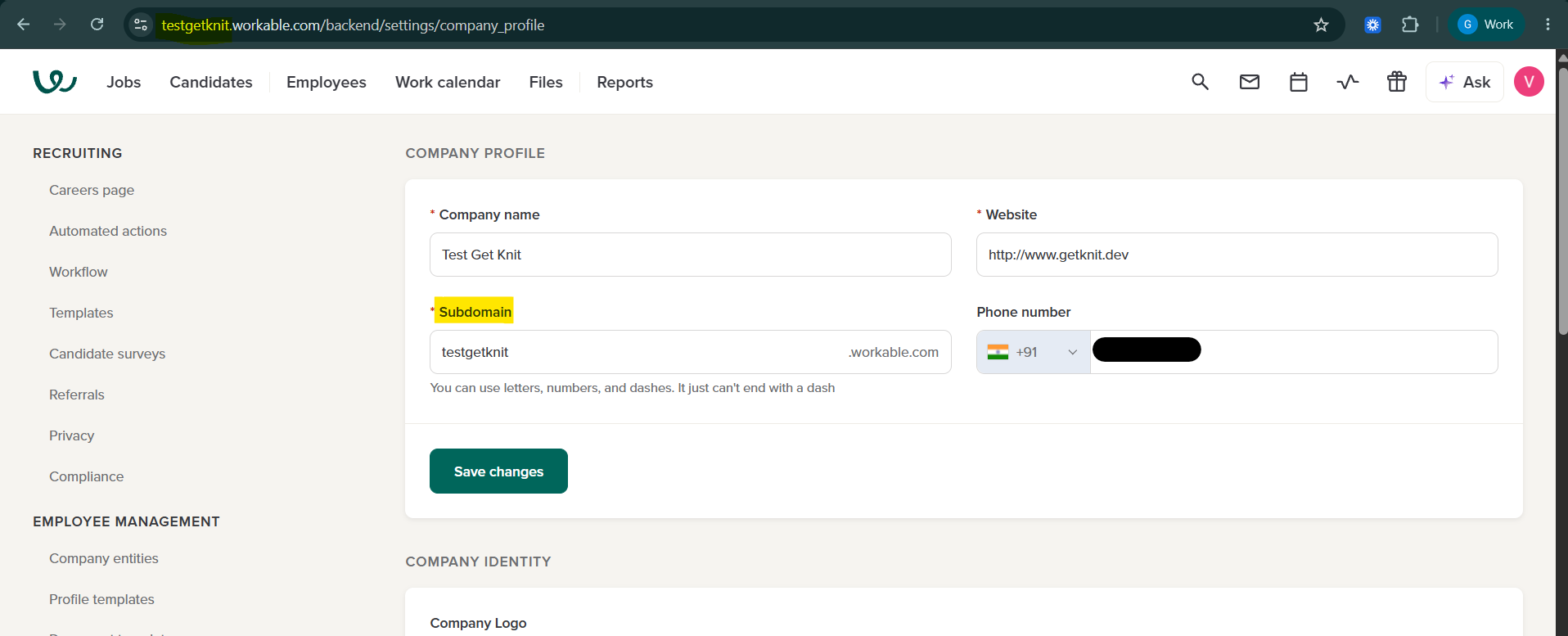
Enter only the subdomain itself (e.g. acme), not the full URL.
3. API Key
The API Key is a personal access token generated from your Workable account that authorizes Knit to call the Workable API. You must be an Admin user in Workable to generate or revoke access tokens — there's no separate access level for this.
Steps to generate an API Key:
-
Log in to Workable as an Admin.
-
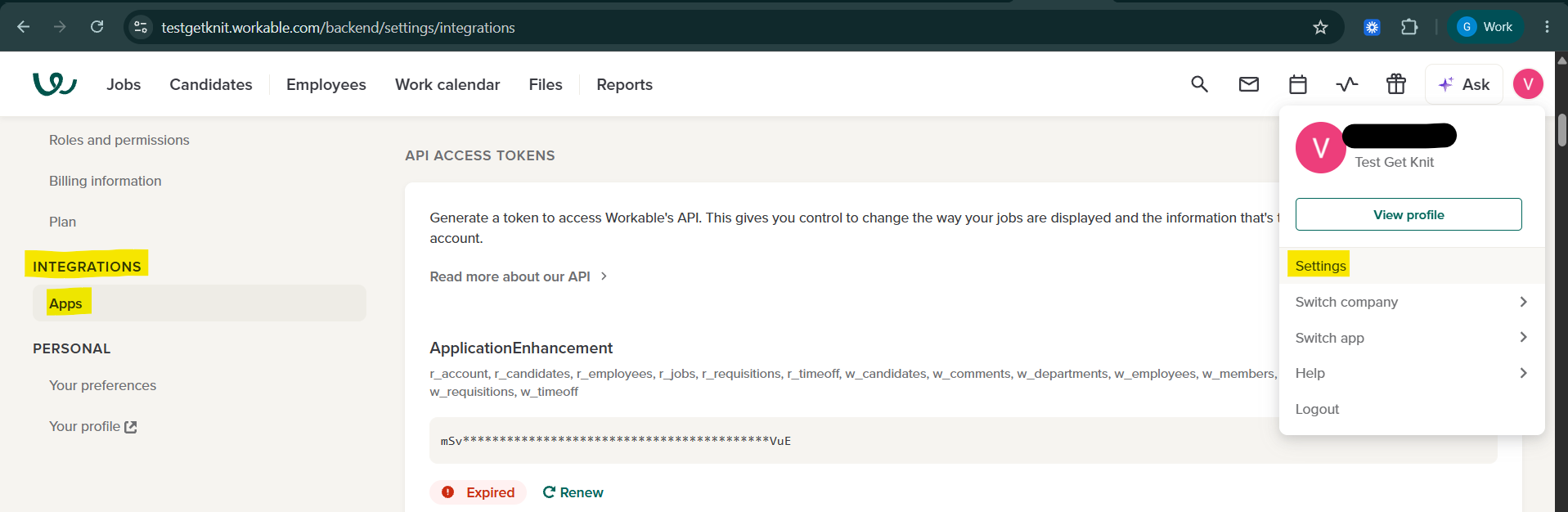
Click your profile icon in the upper-right corner, then navigate to Settings > Integrations > Apps.
-
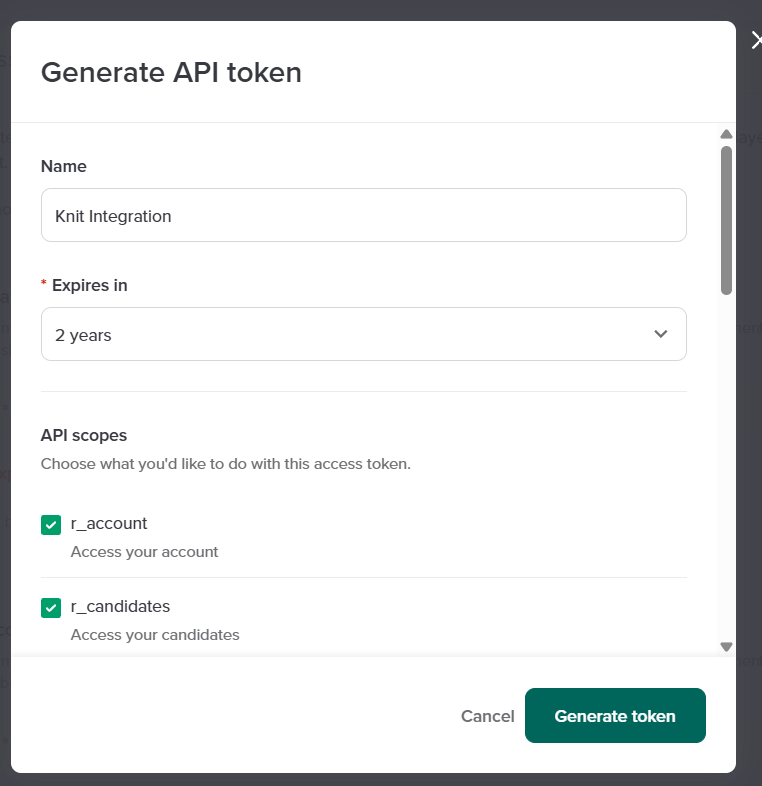
Locate the API Access Tokens section and click + Generate API token.
-
Give the token a name (e.g. "Knit Integration") so you can identify it later.
-
Select an expiration for the token — available options are 30 days, 90 days, 6 months, 1 year, or 2 years.
-
Select the scope(s) the token should have. At least one scope is required. See Required Scopes below for what Knit needs based on the syncs and apis you plan to use.
-
Click Generate token.
-
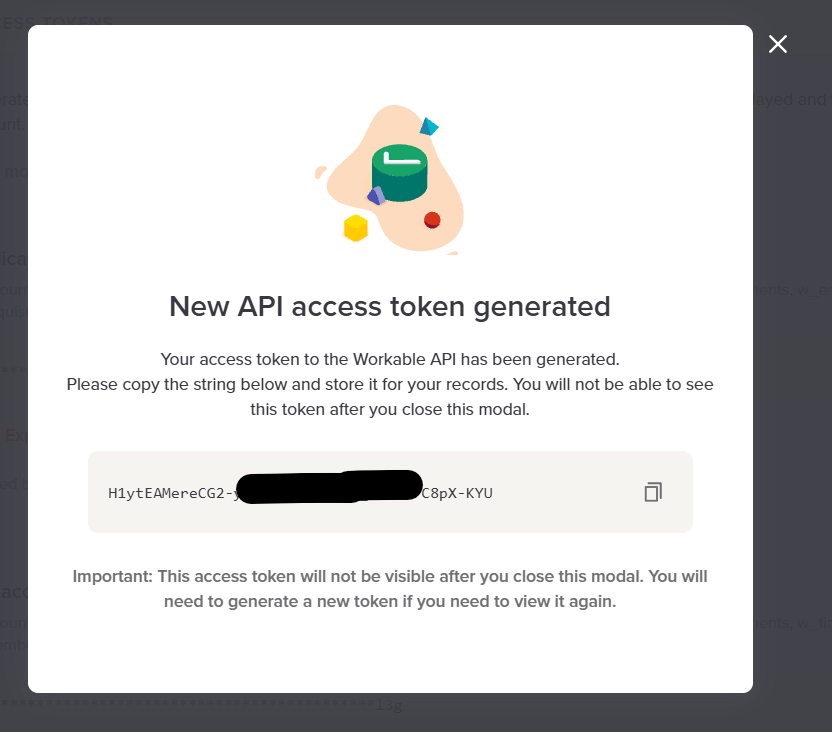
Copy the token immediately from the confirmation modal and paste it into Knit's API Key field. The full token is shown only once — if you close the modal without copying it, you'll need to generate a new one.
For more details, refer to Workable's official documentation:
- Generating/revoking access tokens for Workable's API (Workable Help Center)
- Generate an access token (Workable API Reference)
Required Scopes
Workable API tokens are scoped at creation time — each scope unlocks access to a specific group of SPI endpoints. Enable only the scopes required for the syncs and apis you plan to use through Knit.
| Workable Scope | What it grants access to (per Workable) | Used by Knit for |
|---|---|---|
r_account | /departments, /legal_entities, /work_schedules, /employee_fields — only accessible if Employee Management is enabled on your Workable account | List Departments api |
r_jobs | /jobs, /jobs/:shortcode/stages, /jobs/:shortcode/questions, /jobs/:shortcode/members, plus /accounts, /members, /recruiters, /stages | Jobs sync (ats_jobs); List Jobs, Get Job, List Users apis; job-level details (stages, questions, members) fetched as part of List Applications, Get Application; also required during setup to verify the Admin Email ID via /members |
r_candidates | /candidates, /candidates/:id, /candidates/:id/activities, /candidates/:id/offer | Candidates sync (ats_candidates); Applications sync (ats_applications, since applications are read from candidate records); List Candidates, Get Candidate, Search Candidates, Get Candidate Tags, List Notes, List Applications, Get Application apis |
w_candidates | /candidates, /talent_pool/candidates, /candidates/:id/tags, /candidates/:id/disqualify, /candidates/:id/move, /candidates/:id/comments (also covers w_comments) | Create Candidate, Create Application, Update Candidate, Update Application, Update Application Stage, Reject Application, Add Candidate Tag apis |
w_comments | /candidates/:id/comments (subset of w_candidates) | Add Candidate Note, Add Attachment to Application apis. Not needed separately if w_candidates is already enabled. |
Note: If you only plan to sync data one-way into Knit (Jobs, Candidates, Applications syncs) without using write apis like creating or updating candidates, you only need
r_account,r_jobs, andr_candidates.
For the full list of scopes and the endpoints each one unlocks, see Workable's Supported API scopes documentation.
Updated about 2 months ago