

JobDiva
This guide will help you to connect jobdiva using Knit
Credential Setup Guide
This page explains how to generate the credentials required to connect your application with JobDiva. The integration requires three values: Client ID, Username, and Password, which are used for API authentication.
Prerequisites
- An active JobDiva account
- Administrator access in JobDiva
Client ID
- JobDiva does not allow generating a Client ID from the UI
- The Client ID must be requested from JobDiva Support
- Contact JobDiva Support and ask for an API Client ID for integration purposes
- The Client ID will be shared directly by JobDiva and is mandatory for authentication
Creating an API User
- Log in to JobDiva using an administrator account
- Navigate to Settings > My Team > Add User
- Create a new user by entering the required details such as name, username/email, and password
- This user can be a service or system account and does not need to represent a real user
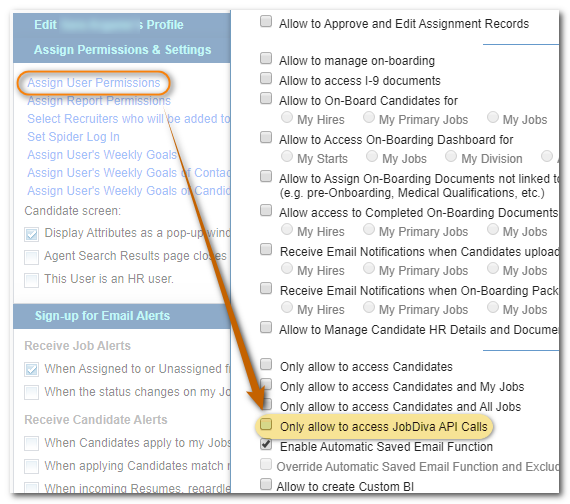
- In the permissions section, enable Only allow access to JobDiva API Calls
- Save the user
- The username and password created here will be used as the API credentials
Once you have all these creds entter them in Knit UI Auth component. You are connected to JobDiva.
Updated 9 months ago
Did this page help you?